WristStudio
Your channel on your wrist.
Apple Watch · watchOS 10 or later · iPhone companion for sign-in
What it does
WristStudio is an independent Apple Watch client for your YouTube channel's creator dashboard. It shows how your channel is doing and lets you handle comments without reaching for your phone.
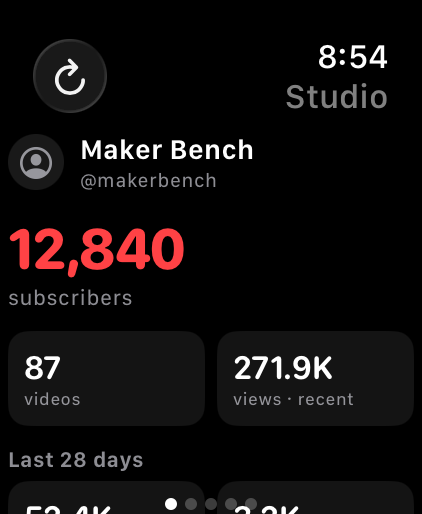
- Exact subscriber count, video count and recent views
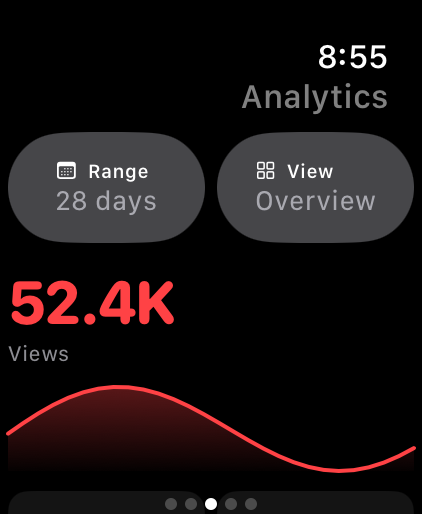
- Views, watch time, subscribers, impressions and CTR over 7, 28, 90 or 365 days, or lifetime
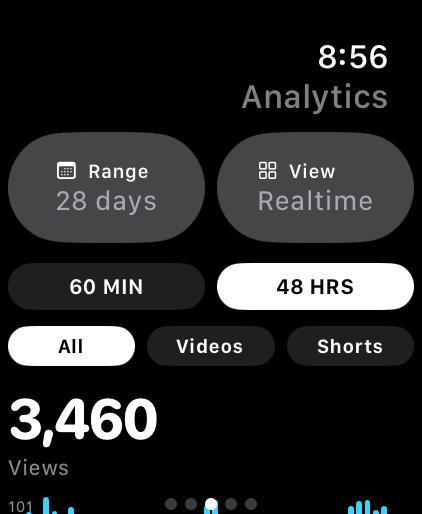
- Realtime activity for the last 60 minutes or 48 hours, with the videos driving it
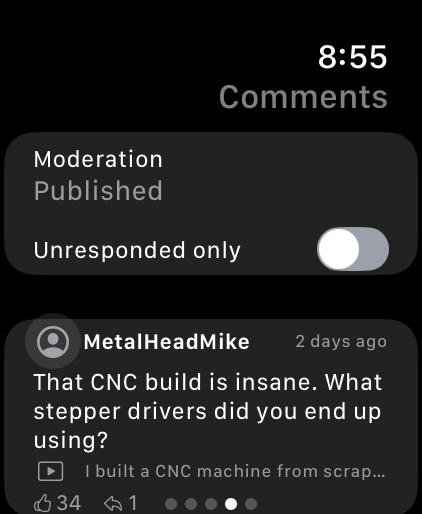
- Read, reply to, heart, approve, remove or report comments — including ones held for review
- Browse uploads and edit a video's title, description, visibility and audience
- Works with channels you manage through channel permissions, not only channels you own
Sign-in happens on iPhone, on Google's own sign-in page. WristStudio never sees, handles or stores your password, and collects nothing.
Questions
- Do I need the iPhone app to use it?
- Only to sign in. Once the session is on the watch, WristStudio runs on its own — the iPhone can be off or out of range.
- Can I try it without signing in?
- Yes. On the watch's sign-in screen, scroll down and tap Try demo channel for a fully populated sample channel. Nothing is sent to YouTube in demo mode.
- Does it work with a channel I manage for someone else?
- Yes. If your Google account has access to a channel through channel permissions, pick that channel when Google asks during sign-in on iPhone, and the watch follows.
- Why does my subscriber count differ from the public one?
- WristStudio shows the exact figure from your own dashboard. The number shown publicly on YouTube is rounded.
- Can I upload or edit thumbnails from the watch?
- No. Uploading and thumbnail editing need files and a large screen, so they stay on phone and desktop.
- I signed out, or requests started failing.
- Open WristStudio on iPhone and sign in again. Sessions expire; signing in again replaces the one stored in the watch's Keychain.
Support
Questions, bugs or feature requests: device0901@proton.me